
Your first livestream?
We’re here to help.
Getting Ready to Go Live
YouTube Live Tips # 1: Create YouTube channel
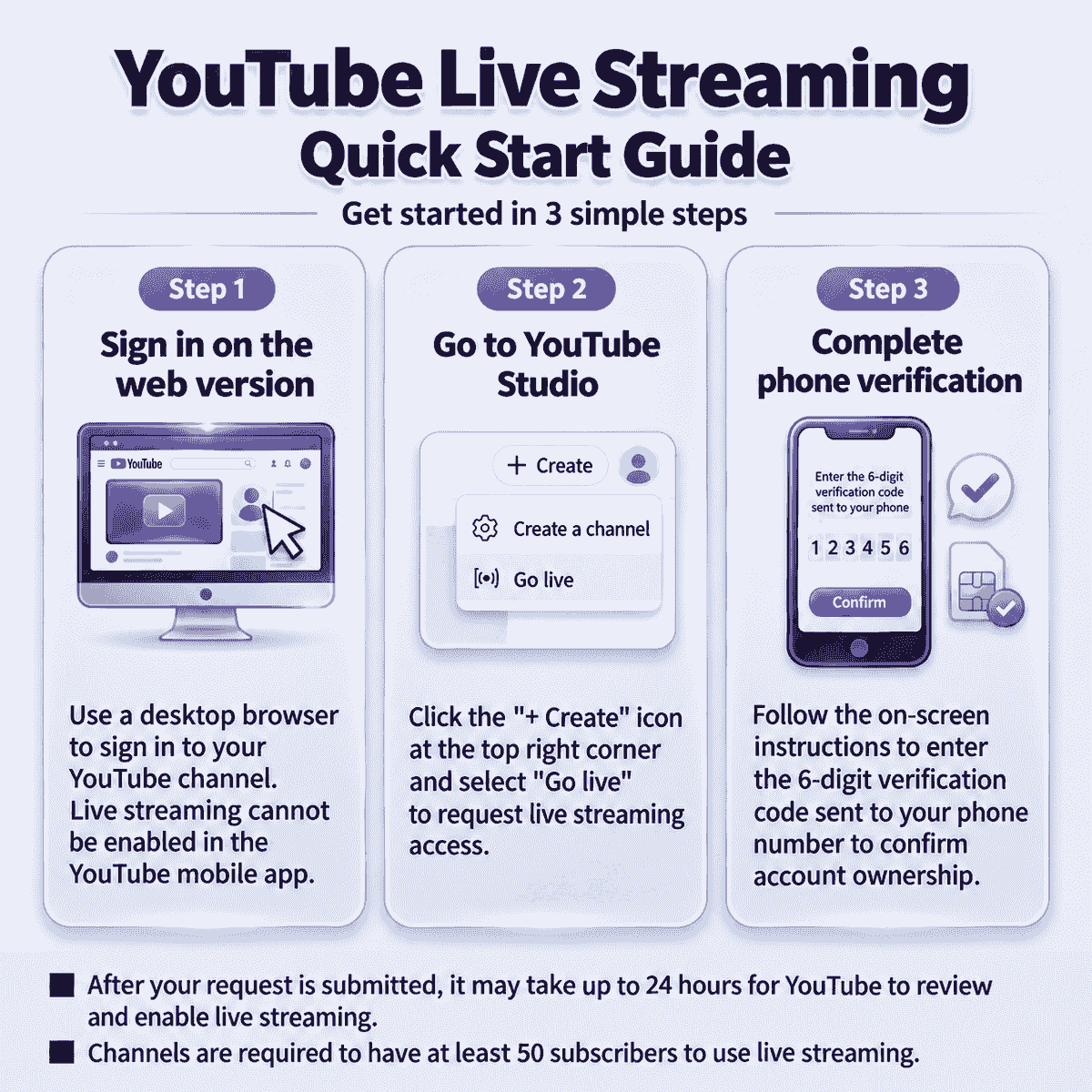
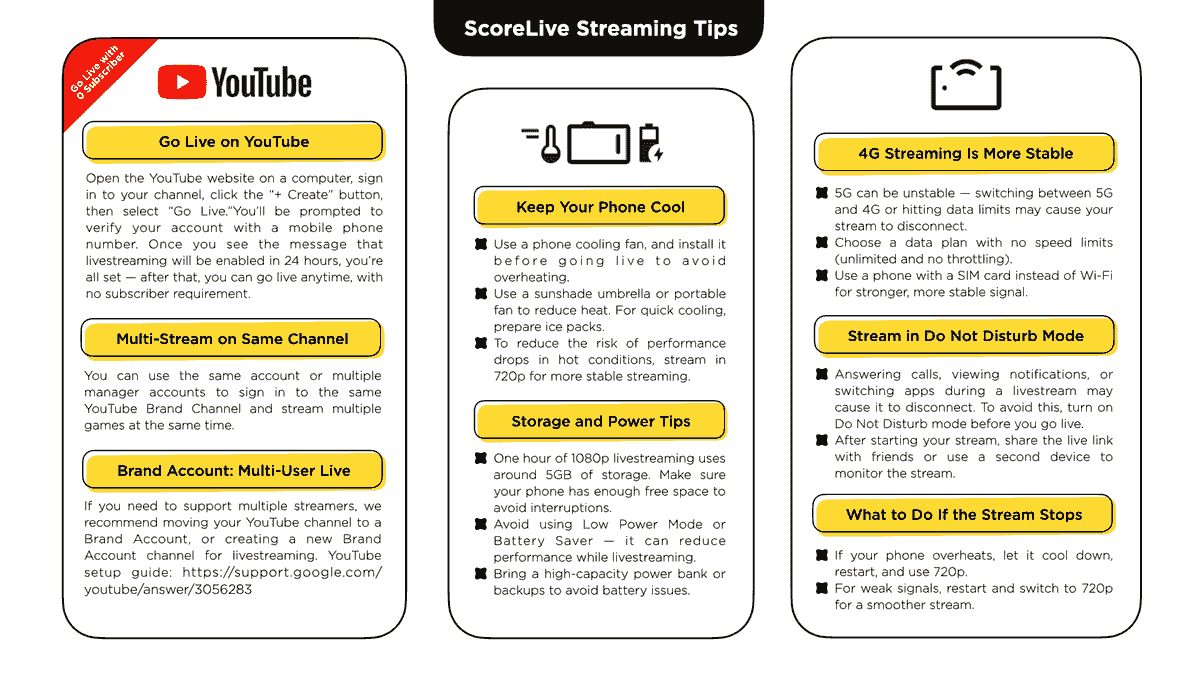
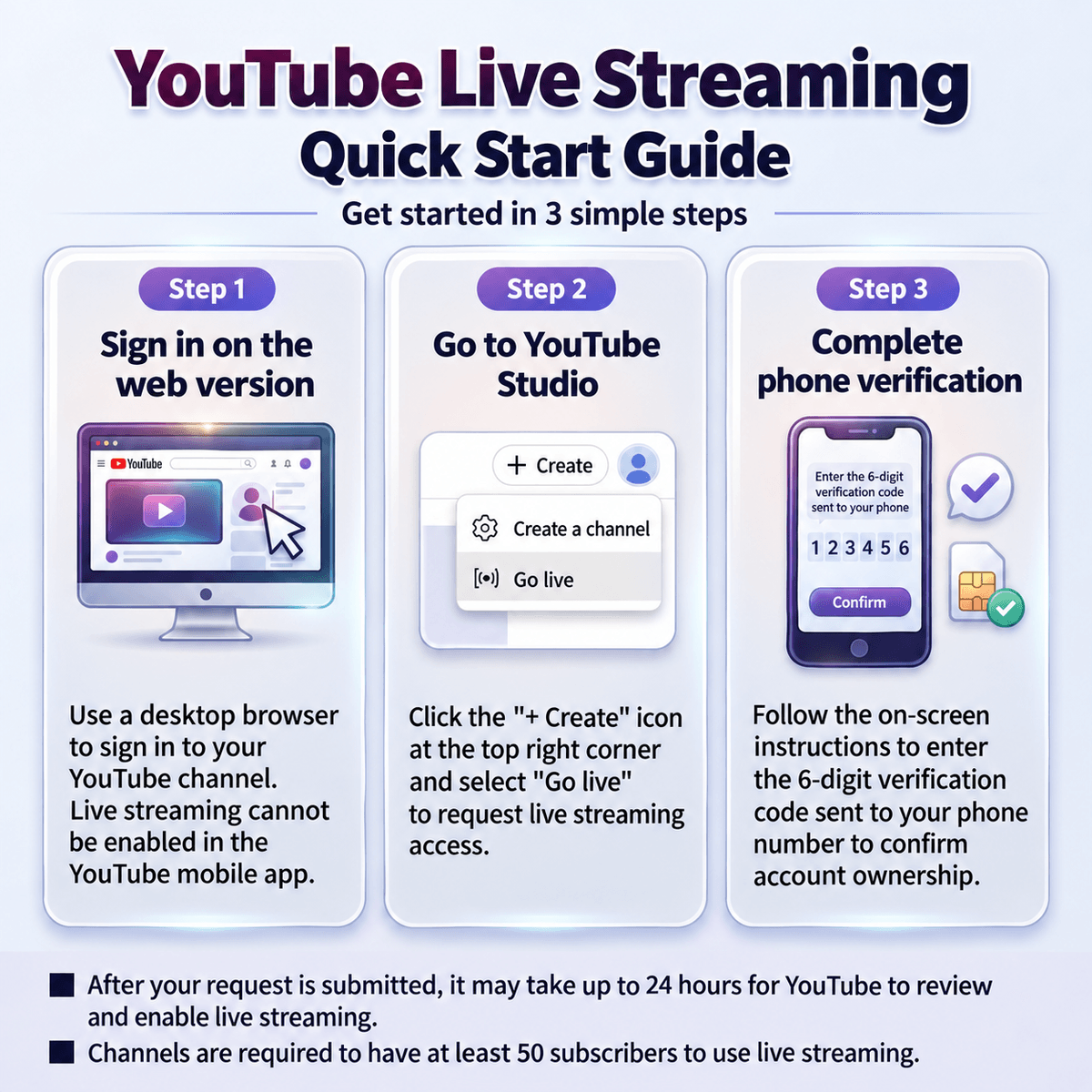
To start live streaming with ScoreLive, you need to set up at least one YouTube channel in advance. Open the YouTube website on a computer (mobile phones and tablets are not supported for this step), sign in to your channel, click the “+ Create” button, and select “Go Live.” You will be asked to verify your account using a mobile phone number. Once you see the message that livestreaming will be enabled within 24 hours, the setup is complete. After that, you can go live at any time, with no subscriber requirement.
Alternatively, you can create a new YouTube channel directly at https://www.youtube.com/account and then enable livestreaming by following the same steps above.
YouTube Live Tips # 2: Using a Brand Account for Multiple Streamers
If you need to support multiple streamers, we recommend moving your YouTube channel to a Brand Account or creating a new Brand Account specifically for livestreaming. You can follow YouTube’s setup guide here: https://support.google.com/accounts/answer/7001996
Facebook Live Tips #1: How to Use a Stream Key
ScoreLive has already preconfigured the Facebook RTMP server URL. Simply enter the Stream Key provided by Facebook to start live streaming via RTMP.
Setup steps:
1. Open the Facebook Live creation page
2. Select “Streaming Software” as the video source
3. Copy the Stream Key provided by Facebook
4. Paste the Stream Key into the RTMP settings in ScoreLive
5. Return to the Facebook web dashboard and manually start the live stream
6. When the stream ends, you must manually end the live stream from the Facebook web dashboard
Facebook official guide: https://www.facebook.com/help/587160588142067
Facebook Live Tips #2: Use a Computer to Start/End the Stream
Based on our testing, even when switching a mobile browser to “Desktop Site” mode, Facebook Live Producer may still fail to properly display the RTMP preview or allow users to start/end the live stream.
For the most stable experience, we currently recommend using a computer to control the start and end of the stream through Facebook Live Producer, while using ScoreLive on your mobile device for RTMP video streaming.
(Note: We will continue working to improve the Facebook live streaming experience.)
VK Live Tips
ScoreLive has already preconfigured the VK RTMP server URL. Simply enter the Stream Key provided by VK to start live streaming via RTMP.
Setup steps:
1. Open the VK live streaming page
2. Create a live stream and obtain the Stream Key provided by VK
3. Paste the Stream Key into the RTMP settings in ScoreLive
4. Start streaming directly from ScoreLive
5. When the stream ends, manually end the live stream from the VK web dashboard
Reference guide: https://streamster.io/blog/manual-how-to-stream-to-vkontakte-with-external-encoder/
FAQs
How to Set Up Remote Control?
Remote Control is available with a paid subscription. To use this feature, both phones must have the same ScoreLive app installed and be connected to the same network, either through a mobile hotspot or the same Wi-Fi network.
Once connected, one phone can be used as the streaming device, while the other serves as the remote control. After pairing the two devices by scanning the QR Code, you can control the scoreboard remotely, allowing streaming and scorekeeping to be handled separately and more efficiently.
Video Tutorial:
https://youtu.be/eGORMIWof0I4The following example uses an iPhone as the streaming device and an Oppo phone as the remote control. Other phone brands and models can also be used.
- Connect Both Devices to the Same Network
Turn on Personal Hotspot on the iPhone and connect the Oppo phone to the iPhone's hotspot. - Enable Remote Control on the Streaming Device
Once both devices are connected, open ScoreLive on the iPhone and enter the streaming control screen. Do not start the livestream yet. Open the Advanced panel, tap Remote Control, and enter the QR Code pairing screen. Make sure the IP address and port information are displayed. - Pair the Remote Control Device
Open ScoreLive on the Oppo phone. On the My Live page, tap Remote Control in the upper-right corner to enter the remote control screen. Confirm that the port number matches the one shown on the streaming device, then tap Scan QR Code and scan the QR Code displayed on the iPhone. Once paired successfully, you can use the Oppo phone to remotely control the scoreboard.
Troubleshooting
If the devices cannot connect, or if the remote control connection is interrupted, disconnect Remote Control on the streaming device first. Close and reopen ScoreLive, then repeat the pairing steps above.
If the streaming device loses its network connection during a livestream and later reconnects, the previously generated QR Code token may expire, causing Remote Control to stop working. If this happens, please restart the Remote Control connection and scan the newly generated QR Code to pair the devices again.
How to Use an External Video Source?
ScoreLive supports external cameras, camcorders, and other HDMI video sources, allowing you to use professional camera equipment instead of your phone’s built-in camera for livestreaming. To use an external video source, you’ll need a compatible video capture device to send the HDMI signal to your phone. The supported devices and connection methods are different for iOS and Android.
iOS Version
ScoreLive for iOS supports external HDMI video through Accsoon SeeMo devices. This feature is currently available in ScoreLive Baseball, with support for Basketball, Volleyball, Soccer, and Racket coming soon. ScoreLive Hoop does not currently support external video sources.
- Connection: Camera / Camcorder → HDMI → Accsoon SeeMo → iPhone
- Setup:
- Connect the HDMI output of your camera or camcorder to the Accsoon SeeMo, then connect the SeeMo to your iPhone.
- Once everything is connected, open ScoreLive and enter the livestream control screen.
- Open the Advanced panel and find Video Source.
- Select HDMI to switch the video source to the external video feed from SeeMo.
- Make sure the video preview is displayed correctly, then start your livestream.
You can also switch between the iPhone’s built-in camera and the external video source during a livestream.
More info: https://en.scorelive.app/blog/accsoon
Android Version
ScoreLive for Android supports external video in Baseball, Basketball, Volleyball, Soccer, and Racket through UVC-compatible HDMI capture devices. ScoreLive Hoop does not currently support external video sources. Devices tested by ScoreLive include J5create JVA01, J5create JVA02, and AVerMedia Live Gamer series.
- Connection:Camera / Camcorder → HDMI → HDMI Capture Device → Android Phone
- Setup:
- Connect the HDMI output of your camera or camcorder to a compatible HDMI capture device.
- Connect the capture device to your Android phone via USB-C.
- Open ScoreLive and enter the livestream control screen.
- Open the Advanced panel and find Video Source.
- Select the external video source. If prompted, allow ScoreLive to access the connected USB device.
- Make sure the external video feed is displayed correctly, then start your livestream.
Before You Start
External video compatibility may vary depending on your phone model, operating system, capture device, and the HDMI output format of your camera. A capture device supporting UVC does not necessarily guarantee compatibility with ScoreLive, so we recommend using devices that have been tested by us whenever possible.
If no video appears after connecting your equipment, check that the HDMI cable and capture device are properly connected. Try disconnecting and reconnecting the equipment, then reopen ScoreLive.
For longer livestreams, make sure your phone, camera, and capture device have sufficient power. External video equipment may consume additional power, so a reliable power setup is recommended to prevent interruptions during your livestream.
Can I Use My Paid Subscription on Multiple Devices?
Yes. Your ScoreLive paid subscription can be used on multiple devices, but each device must be signed in with the same account that was used to purchase the subscription.
- iOS Version
If you subscribed to ScoreLive through the App Store, your other iPhone or iPad must be signed in with the same Apple Account used to purchase the subscription. If you switch to a new device, reinstall the app, or ScoreLive does not recognize your subscription, first make sure you are signed in with the correct Apple Account, then use Restore Purchases in ScoreLive. Additionally, the iOS version now supports Family Sharing.
- Android Version
If you subscribed to ScoreLive through Google Play, your other Android devices must be signed in with the same Google Account used to purchase the subscription. If you switch to a new device, reinstall the app, or ScoreLive does not recognize your subscription, first make sure Google Play is using the same Google Account that was used for the original purchase.
- Please Note
Your subscription is linked to the Apple Account or Google Account used for the purchase, not to a specific device. This means you do not need to purchase another subscription when switching devices. However, subscriptions cannot be transferred or shared between different accounts.
In addition, iOS and Android subscriptions are separate. A subscription purchased through the App Store cannot be used on Android, and a subscription purchased through Google Play cannot be used on iPhone or iPad.
- Connect Both Devices to the Same Network
Storage and power tips
One hour of 1080p livestreaming uses about 5GB of storage. Make sure your phone has enough free space so the stream isn’t interrupted. Avoid using Low Power Mode or Battery Saver, as these can reduce performance during livestreaming. Bring a high-capacity power bank or extra backups to prevent battery issues during the game.
Keep Your Phone Cool
Use a phone cooling fan and attach it before you go live to prevent overheating. Set up a sunshade or use a portable fan to keep things cool. Keep ice packs on hand for quick cooling if needed. In hot weather, streaming in 720p helps keep the stream stable and avoids performance issues.
Stream in Do Not Disturb Mode
Answering calls, getting notifications, or switching apps during a livestream can cause it to disconnect, so be sure to turn on Do Not Disturb before you go live to keep the stream running smoothly. Once the stream starts, share the live link with friends or use another device to keep an eye on the stream.
Mobile Network Recommendations for Livestreaming
If you have an unlimited 5G plan without speed throttling and a stable signal, you can stream using 5G. Otherwise, based on our testing, 4G is generally more stable. We also recommend using your phone’s mobile data directly instead of a hotspot from another phone.
What to Do If the Stream Stops
Temporary network interruptions may occur during a livestream. ScoreLive automatically attempts to reconnect and resume streaming when the connection is restored. If the stream does not recover, check your network connection and restart the livestream manually. If your phone is overheating or the connection remains unstable, let the device cool down and consider switching to 720p for better stability.
Multi-Stream on Same Channel
You can use the same account or add multiple manager accounts to sign in to the same YouTube Brand Channel. This allows different users to stream multiple games at the same time under one channel, making it easy to run several livestreams simultaneously without creating separate channels.
How-to guides
ScoreLive Baseball
ScoreLive Basketball
ScoreLive Volleyball
ScoreLive Soccer
ScoreLive Racket
ScoreLive Hoop
Quick Tips
Customer Support
LINE Official Account


© 2026 Score Live Company, Ltd.